Showing posts with label programming. Show all posts

Most Commonly Used PHP Functions

htmlentities()

This PHP function is used to convert all applicable characters to HTML entities. When you want to display some HTML code in your page it will show the result of your code but not the actual code in that kind of situation you can use htmlentities() and one more function Htmlspecialchars() will be explaining more about this function down.
<?php
$str = "I like <b>PHP</b>";
echo "Actual result:<br>";
echo $str.'<br><br>';
echo "Result by using function:<br>";
echo htmlentities($str);
?>

Result:

Htmlspecialchars()
<?php
$str = "<a href='http://www.phpjavascript.com/'>PHP</a>";
echo "Actual result:<br>";
echo $str.'<br><br>';
echo "Result by using function:<br>";
echo htmlspecialchars($str, ENT_QUOTES);
?>
Result:

strip_tags()
This function is identical to htmlentities() function except strip_tags function strips html tags and html from a string.
<?php
$str = "<a href='http://www.phpjavascript.com/'>PHP</a>";
echo "Actual result:<br>";
echo $str.'<br><br>';
echo "Result by using function:<br>";
echo strip_tags($str, ENT_QUOTES);
?>
Result:

explode()
The explode function take its input as a string and convert it into an array. The function takes the first parameter as separator and second one is a string. It converts a string into an array based on the separator.
<?php
$cars = "BMW,Mercedes,Audi,Honda,Ferrari";
$brands = explode(",", $cars); //separate by comma(,)
echo 'Brand Name : '.$brands[0].'<br>'; //BMW
echo 'Brand Name : '.$brands[2]; //Audi
?>

Result:


implode()
This function is just opposite to explode function. As explode function converts string into array, but the implode function take its input as array and convert it into string.
<?php
$cars = array("BMW","Mercedes","Audi","Honda","Ferrari");
$brands = implode(",", $cars);
echo $brands;
?>
Result:

rand()
The rand() function outputs a random number. there are two optional parameters that you can add to set mi and max for the number.
<?php
echo rand();
echo '<br>';
echo rand(10,20);
?>
Result:

str_replace()
This function is useful when you want to do a simple match and replace. 
This function accepts four parameters,
 three required. find, replace, string, count(optional).
<?php
$string = 'aaa-bbb-ccc';
echo str_replace('-', '*', $string);
?>
Result:
date()
The date() function can have two parameters, 
format(required) and timestamp(optional).
<?php
echo date("d-m-Y h:i:s");
?>
Result:
strlen()
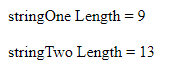
The strlen function will return the length of a given string. 
The spaces and characters are added to the count.
<?php
$stringOne = "Hello PHP";
echo 'stringOne Length = ' . strlen($stringOne) . '<br><br>';
$stringTwo = " Welcome code";
echo 'stringTwo Length = ' . strlen($stringTwo);
?> 
Result:
count() This function count the number of element in a array.
<?php
$Alphabets = array("A", "B", "C", "D", "E");
echo 'Count = '.count($Alphabets);
?>
Result: array_combine() This function creates an array by using one array for keys and another for its values. <?php $fruit_color = array("green", "red", "yellow"); $fruits = array("avocado", "apple", "banana"); $fruits_array= array_combine($fruit_color, $fruits); print_r($fruits_array); ?> Result:
array_unique()
You can use this function to removes duplicate values from an array.
<?php
$input = array("a" => "green", "red", "b" => "green", "blue", "red");
$result = array_unique($input);
print_r($result);
?>
Result:
print_r()
This function is used to print array variable in a way that’s readable by humans.
<?php
$fruits = array ("a" => "Banana", "b" => "Apple");
print_r ($fruits);
?>
Result:
strrev()
This function reverses the given string.
<?php
echo strrev("Hello PHP");
?>
Result:
trim()
This function removes characters, space from the string form both the ends.
<?php
$str = "Hello PHPJavaScript";
echo $str . "<br>";
echo trim($str,"Ht");
?>
Result:
ucfirst()
This function Converts the first character to uppercase.
<?php
echo ucfirst("hello php!");
?>
Result:
For all PHP built in functions, go to  PHP.NET
Please do share and fallow our blog for more intresting content.

PHP And JavaScript

PHP

PHP is a server-side scripting language and a powerful tool for making dynamic and intuitive Web pages.

PHP: Hypertext Preprocessor


Code written in PHP executes considerably speedier than those Code written in different languages, for example, JSP and ASP.

It is powerful enough to run the largest social network (Facebook)! and biggest blogging system on the web WordPress.

PHP is platform independent i.e runs on various platforms (Windows, Linux, Unix etc.)

PHP is compatible with almost all servers(IIS, Apache etc..).

PHP can create, open, read, write, delete, and close files on the server
PHP can add, delete, modify data in your database
PHP can secure the data by encrypting
PHP can output images, PDF files, and even Flash movies. You can also output any text, such as XHTML and XML and JSON.
PHP file can contain content, HTML, CSS, JavaScript.

<!DOCTYPE html>
<html>
<body>

    <?php
    echo "Learn PHP";
    ?>

   <script>
   document.write("PHP and JavaScript");
   </script>

</body>
</html>

Wide range of extensions and other ad-onsLarge Community/Libraries/Frameworks 
3rd Largest StackOverflow Community
5th Largest Meetup Community
5th Most Popular language at GitHub
Best documentation on the web Tons of blogs and 
"PHP is easy to learn"

JavaScript

JavaScript is an object-based scripting language that is lightweight and cross-platform.

JavaScript is translated. The JavaScript Translator (embedded in the browser) is responsible to translate the JavaScript code.

JavaScript can be used for client-side validation
JavaScript can be used for dynamic drop-down menus
JavaScript can be used for displaying data and time
JavaScript can be used for show and hide data
JavaScript can be used for displaying popup windows and dialog boxes


<!DOCTYPE html>
<html>
<body>

<h2>Welcome to JavaScript</h2>

<script>
document.write("Hello JavaScript by JavaScript");
</script>

</body>

</html>


How To Populate JSON Data In Select Dropdown Using jQuery?

ViewUserData.php


<?php

$DatabaseServer = "localhost";

$DatabaseUsername = "root";

$DatabasePassword = "root";

$DatabaseName = "demo";


$Connection = mysqli_connect($DatabaseServer , $DatabaseUsername ,  $DatabasePassword , $DatabaseName);


if($Connection=== false){

    die("ERROR: Could not connect. " . mysqli_connect_error());

}


$SQL = mysqli_query($Connection, "SELECT * FROM User");

$Result = array();


while($Row = mysqli_fetch_assoc($SQL))    {

       $Result[] = array(

          'FirstName' => $Row['FirstName']            

       );

    }


    echo  json_encode($Result);

?>


Output:

JSON Array:


[{"UserID":"1","FirstName":"Ram","LastName":"Sri"}]


ViewUserData.html


<Html>

<head>

<script language="JavaScript" src="https://code.jquery.com/jquery-3.2.1.min.js"></script>

<script>

$(document).ready (function () {

            $.getJSON ("ViewUserData.php",

                function (json) {

                    for (var i = 0; i < json.length; i++) {

                        $("#UserID").append("<option>" + json[i].FirstName+ "</option>");

                    }

                });

});

</script>

</head>


<body>


<select id='UserID'>

//Your Json Array comes here
</select>


</body>


</html>


Output:


MySQL: Run these two queries


CREATE TABLE `user` (
  `UserID` int(12) NOT NULL,
  `FirstName` varchar(48) NOT NULL,
  `LastName` varchar(48) NOT NULL,
  `Email` varchar(128) NOT NULL,
  `City` varchar(48) NOT NULL
) ENGINE=InnoDB DEFAULT CHARSET=latin1;

INSERT INTO `user` (`UserID`, `FirstName`, `LastName`, `Email`, `City`) VALUES
(1, 'Ram', 'Sri', 'zzz@zzz.com', 'Delhi'),
(2, 'Krishna', 'Vasudev', 'yyy@yyy.com', 'Delhi');

Labels

php (35) javascript (31) phpjavascript (30) jquery (23) html (20) mysql (14) database (9) codeigniter (4) json (4) bar chart (2) calendar (2) column chart (2) framework (2) google maps (2) query (2) tables (2) url (2) dropdown (1)

Popular Posts